On this page
Checked against OpenAI's, Anthropic's and the OAIC's own pages on 11 November 2026.
Yes, for most everyday work, if you set it up right and follow a few rules. Switch off model training (or use a business plan, where it's off by default), strip names and contact details out before you paste, and keep passwords, financial and health details out altogether. Ten minutes in Settings and a one-page rule for your staff covers most of it.
This guide is general information, not legal advice. If you handle health information, work under a government contract or aren't sure the Privacy Act covers you, talk to a lawyer or check with the OAIC.
What actually happens to what you type
Three questions matter: is it used to train future models, how long is it kept, and who can see it. The answers depend on your plan more than on the tool. As of November 2026:
| ChatGPT Free, Go, Plus, Pro | ChatGPT Business | Claude Free, Pro, Max | Claude Team, Enterprise | |
|---|---|---|---|---|
| Used for training? | Yes by default, until you switch it off | No, by default | Only if you allow it. You choose at sign-up and can change it in Settings | No, by default |
| Saved chats | Kept until you delete them | Kept for as long as your admin sets | Kept until you delete them | Kept in the product until deleted |
| Deleted chats | Gone from view at once, deleted from OpenAI's systems within 30 days | Removed within 30 days | Gone from history at once, deleted within 30 days | Deleted within 30 days |
| Chats that skip your history | Temporary Chat: not saved to your history, kept up to 30 days for safety | Temporary Chat: not saved to your history, kept up to 30 days for safety | Incognito chat: not saved to your history, kept 30 days | Incognito chat: not saved to your history, kept 30 days and included in owner data exports |
- ChatGPT Free, Go, Plus, ProTraining on until you switch it offDeleted chats gone within 30 days
- ChatGPT BusinessTraining off by defaultDeleted chats gone within 30 days
- Claude Free, Pro, MaxTraining only if you allow itDeleted chats gone within 30 days
- Claude Team, EnterpriseTraining off by defaultDeleted chats gone within 30 days
A few details catch people out:
- Thumbs up or down counts. On ChatGPT, rating a reply means the whole conversation may be used for training, even with training switched off. On Claude, a rating stores the whole conversation for up to 5 years, on every plan. Don't rate chats that contain client details.
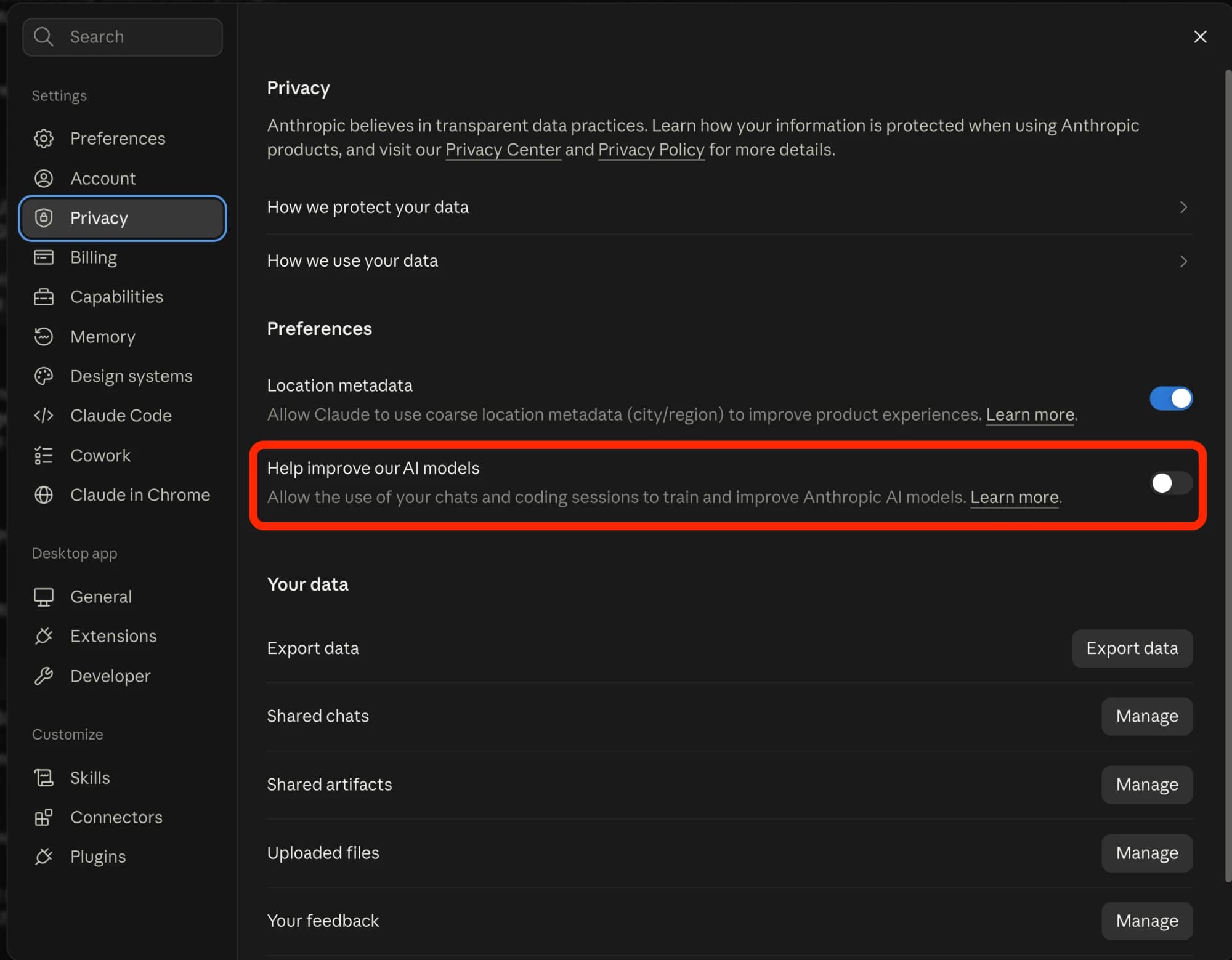
- Allowing training on Claude also extends retention. If you leave "Help improve our AI models" on, Anthropic may keep de-identified chats for up to 5 years in its training pipelines. With it off, the normal 30-day deletion applies.
- Who can see it. On a business plan, your workspace admins can view and export staff chats. OpenAI says a limited number of authorised staff and contractors can access stored business chats for support, abuse checks and legal reasons. Both companies keep chats flagged for misuse for longer.
- Switching training off doesn't delete anything. Your history stays where it is. Deleting a chat is a separate step.
In short: paid individual plans are fine once training is off. Business plans start safer and add admin control, which matters once staff are involved.
What Australian privacy law expects
The Privacy Act 1988 and its 13 Australian Privacy Principles (APPs) set the rules for handling personal information. Personal information is anything that identifies a person or reasonably could: a name, an email, a phone number, a photo, even a job address plus a description of the job.
Most small businesses aren't covered. If your annual turnover is $3 million or less, the Act generally doesn't apply to you. But it does apply, whatever your turnover, if you are (among others):
- a health service provider, which the OAIC says includes allied health, complementary therapists, pharmacists, child care centres and private schools
- trading in personal information, such as selling or swapping customer lists
- a contractor under a Commonwealth government contract
- providing services covered by the anti-money laundering laws, which since 1 July 2026 includes many accountants, lawyers, conveyancers and real estate agents (the Act then covers the personal information you handle to meet your anti-money laundering obligations, such as checking a client's identity)
- related to a larger business the Act covers, or
- a business that has chosen to opt in.
The OAIC has a checklist to work out where you sit.
If you are covered, the OAIC's AI guidance says:
- The Act applies to personal information you put into an AI tool, and to anything it produces about a person.
- Under APP 6, you can only use client information for the reason you collected it, unless they've agreed or would reasonably expect the new use. Pasting it into an AI tool can be a new use.
- Check the tool's terms and settings, and turn off features that hand personal information to the provider.
- Say in your privacy policy that you use AI, and train staff on what's allowed.
- As best practice, don't enter personal information, and particularly sensitive information such as health details, into publicly available AI tools.
If you aren't covered, it's still worth acting as if you are. Your clients expect it, and since June 2025 people can sue for a serious invasion of privacy under a separate law that reaches further than the APPs. The OAIC also recommends exempt businesses protect the personal information they hold.
What's fine, what to strip out, and what never goes in
Green: fine to paste
- Your own business know-how: processes, checklists, service descriptions, templates
- Marketing copy, social posts, website drafts
- Public information, such as a client's website or a published tender
- Scenarios with the identifying details taken out ("a client in the northern suburbs wants a quote for...")
- Your own notes about your own work
Amber: strip it out first, then paste
- Names. Use "Client A" or "the homeowner".
- Email addresses, phone numbers and street addresses
- Anything that points to one person: a rare job in a small town, a date of birth, a licence plate
- Invoice amounts and payment histories tied to a named client
- Staff names in anything about performance or pay
A quick test: if a stranger read it, could they work out who it's about? If so, strip more.
Red: don't paste
- Passwords, API keys and login codes
- Bank account, card, tax file, Medicare, licence or passport numbers
- Health information about clients or staff
- Anything a contract or NDA says you must keep confidential
- Whole client lists or CRM exports
- Details about children
If you're a health service provider, treat client health details as red even on a business plan, unless your lawyer and your privacy policy say otherwise.
- Fine to pasteTemplates and checklists · Marketing copy · Public information
- Strip it out firstNames · Phone numbers and emails · Street addresses
- Never pastePasswords · Card and bank numbers · Health details · Tax file numbers
The settings to change, step by step
Labels move around as the apps update. These are as of November 2026.
ChatGPT Plus (or Free, Go, Pro)
- Click your profile icon, then Settings.
- Click Data controls.
- Switch Improve the model for everyone off, then click Done. It applies on all your devices once you're signed in.
- For a one-off sensitive question, start a Temporary chat from the dotted chat icon at the top right of a new chat. Choose unpersonalised if you don't want your memories used.
- Check what ChatGPT remembers about you in Settings, Personalization, Memory, and delete anything about clients.
ChatGPT Business Training is off by default, so there's nothing to switch. As the admin, check your workspace's retention setting and tell staff not to rate chats with client details.
Claude Pro (or Free, Max)
- Click your name at the bottom left, then Settings.
- Click Privacy.
- Switch Help improve our AI models off.
- For a one-off sensitive question, click the ghost icon at the top right of a new chat (outside a project) to start an Incognito chat.
- In Settings, Memory, switch Include sensitive topics in memory off, and review what's saved.
Claude Team Training is off by default. As an owner, you can stop staff sending ratings to Anthropic: go to Organization settings, Data and Privacy, and turn off Rate chats.
A one-page staff rule you can copy
Using ChatGPT and Claude at [Business name]
- Use only your work account on our [ChatGPT Business / Claude Team] plan. No personal accounts for work.
- Never paste passwords, bank or card numbers, tax file or Medicare numbers, or health information.
- Before pasting anything about a client or staff member, take out names, emails, phone numbers and addresses. Use "Client A" instead.
- Never paste whole client lists or exports from [our CRM / job system].
- Don't use thumbs up or down on chats that mention clients.
- Check every answer before it goes to a client. Whoever sends it owns it.
- Not sure? Ask [name] before you paste.
Last reviewed: [date]
Print it, pin it near the desk, and go through it with each person once.
FAQ
Does ChatGPT use my data for training?
On Free, Go, Plus and Pro, yes, unless you switch off "Improve the model for everyone" in Settings, Data controls. On ChatGPT Business and Enterprise, not by default.
Is Claude safer than ChatGPT for business data?
They're closer than people think. Both keep business plans out of training by default, both delete chats within 30 days of you deleting them, and both let you switch training off on individual plans. Pick the tool that suits your work and set it up properly.
Can I put client information into ChatGPT if I turn training off?
Training off lowers the risk, but the company still stores the chat. Strip out names and contact details first, and keep financial and health details out. If the Privacy Act covers you, the OAIC's best-practice advice is not to enter personal information into publicly available AI tools at all.
Does the Privacy Act apply to my small business?
Usually not if your turnover is $3 million or less, but it does if you're a health service provider, trade in personal information, hold a Commonwealth contract or provide services covered by the anti-money laundering laws (since 1 July 2026, many accountants, lawyers, conveyancers and real estate agents, for the personal information they handle to meet those obligations, such as identity checks), among other exceptions. The OAIC's small business checklist will tell you.
Do I need to tell my clients I use AI?
If the Privacy Act covers you and you put client information into AI tools, the OAIC says your privacy policy should say so. Even if it doesn't, a line in your policy builds trust.
Is a Team or Business plan worth it for privacy?
Once two or more people use it, yes. Training is off by default and everyone gets their own login.
Sources
Checked 11 November 2026.
- OAIC, Guidance on privacy and the use of commercially available AI products
- OAIC, Small business
- OAIC, Privacy guidance for reporting entities under the Anti-Money Laundering and Counter-Terrorism Financing Act
- OAIC, Australian Privacy Principles quick reference
- OAIC, Statutory tort for serious invasions of privacy
- OpenAI Help Center, Data controls in ChatGPT
- OpenAI Help Center, Chat and file retention in ChatGPT
- OpenAI, Enterprise privacy at OpenAI
- Anthropic, Updates to Consumer Terms and Privacy Policy
- Anthropic Privacy Center, How long do you store my data?
- Anthropic Privacy Center, How do I change my model improvement privacy settings?
- Anthropic Privacy Center, Is my data used for model training?
- Anthropic Privacy Center, How long do you store my organization's data?
- Claude Help Center, Use incognito chats